Blog/Software
Trello for property management: a board that works, and where it stops
 Maud Naett · Updated November 14, 2026 · 8 min read
We make Recal · How we compare

On this page+
Short answer
For a couple of homes, a Trello board with a card per changeover is simple and works well on a phone — the setup is below. Past that, a property tool such as Recal does what a board can't: it reads your Airbnb and Booking.com calendars, catches clashes and gives each owner their own page.
Trello is the friendliest of the work tools: lists, cards you drag from left to right, and a phone app cleaners pick up in minutes. That's exactly why rental managers try it for changeovers. Can it run the operation?
It can run the changeover board. Here's the setup that works, the shortlist, and where the board stops.
The shortlist:
- Recal — best for running rentals with a team and owners (we make it).
- Trello, set up as below — best for one to three homes and a small cleaning team.
- A shared spreadsheet — best for one home and no team.
The board, step by step
Keep it to one board for the operation, with these lists from left to right:
Coming up → To clean → Cleaning → Ready → Problem
- One card per changeover, titled with the property and date ("Casa Verdi — Sat 14").
- Labels for the property, one colour each, so a glance tells you which house.
- Due date set to the next check-in time.
- A checklist on each card for the standard clean, plus a line at the top for what's different this time.
- Members for whoever is cleaning, so it shows up on their phone.
A Saturday on the board looks like this:
| Coming up | To clean | Cleaning | Ready | Problem |
|---|---|---|---|---|
| Can Blau — Sun 15 | Villa Sa Punta — Sat 14, in 17:00 | Casa Verdi — Sat 14, in 16:00 | Es Pins — Sat 14, in 15:00 | Villa Sa Punta — hot tub panel |
Then add automations with Butler, Trello's built-in rules:
- When a card moves to Ready, mark the checklist complete and notify the arrival person.
- When a card moves to Problem, add the manager and set a due date for today.
- Every Thursday, create the cards for Saturday's changeovers from a template card.
The free plan includes 250 automation runs a month across the workspace, Standard 1,000, and Premium unlimited.
Where it stops
Trello is a task board. It doesn't know what a booking or a property is:
- No calendar import from Airbnb or Booking.com. Trello's Calendar Power-Up publishes your board's dates as a calendar link, but it doesn't import a booking platform's calendar. Power-Ups that sync with Google Calendar exist, so you'd bring Airbnb into Google, then Google into Trello. Each step is somewhere a booking can go missing.
- The changeover card is only as good as the person who made it. Nothing creates it from the booking; a late booking means a card nobody added.
- Clashes aren't caught. Two cards for the same house on the same Saturday look perfectly normal.
- Owners get a board, not their page. You can invite an owner to a board, but they'll see your team's working cards, not their bookings, income and what was fixed.
- The calendar view costs more. It's on Premium, at $10 per user per month billed annually.
The same job in Recal
Recal starts from the property and the stay:
- Calendars come in on their own. Each platform's calendar link is imported and refreshed every hour, and an overlap is held as a conflict for you to resolve. How calendars work.
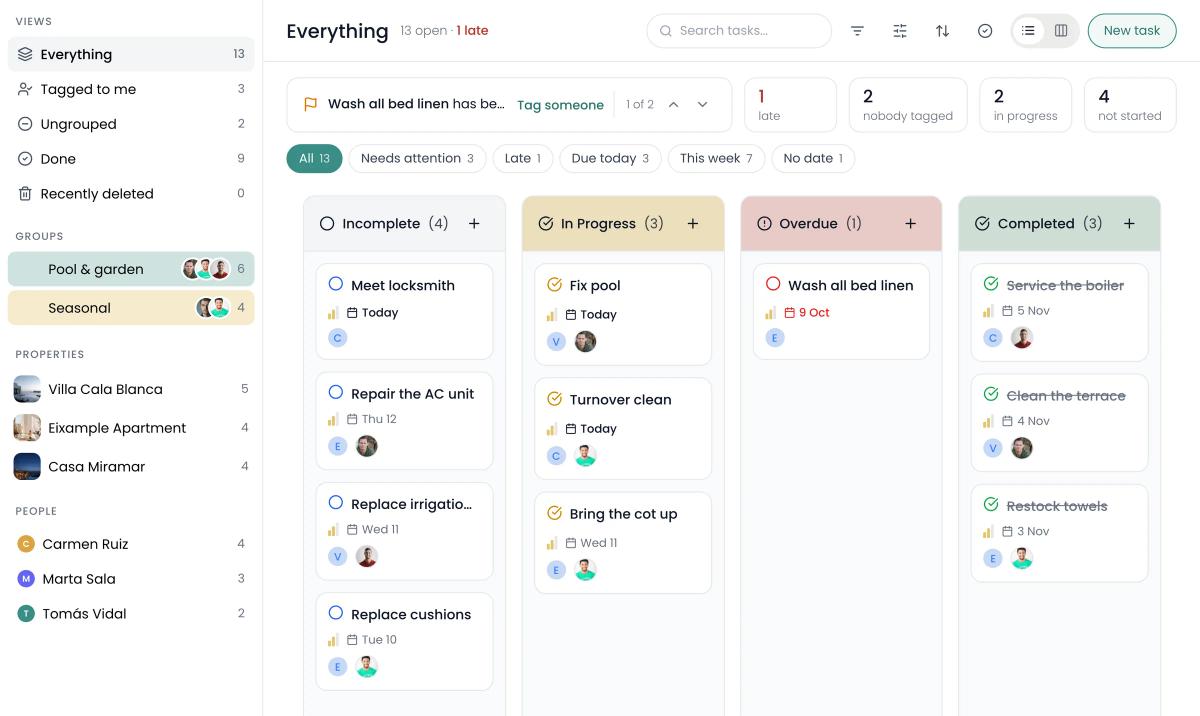
- Changeovers are tasks on a board the team shares, assigned to the cleaner, on their phone; staff see only their own properties. How tasks work.
- Owners get their own page with bookings, revenue and occupancy, and a statement each month, opened with a password link. The owner page.
- Maintenance has a schedule for each home, with a reminder before each visit. Maintenance.
What it costs
Trello prices per user; Recal prices per plan, with listings and staff included. Trello's figures are billed annually, from its pricing page on 14 November 2026, on Premium for the calendar view. Trello prices in dollars, Recal in euros.
| Your operation | Trello Premium | Recal |
|---|---|---|
| 3 homes, 2 people | $20/month | €19/month (Host: 3 listings, 3 staff) |
| 10 homes, 5 people | $50/month | €49/month (Manager: 15 listings, 5 staff) |
| 25 homes, 10 people | $100/month | €99/month (Business: 40 listings, unlimited staff) |
Trello Standard, at $5 per user, is half the price but has no calendar view. Recal's plans have no commission on bookings, and extra listings are €5 a month each.
When Trello is enough
Stay on Trello if you have one to three homes, one or two cleaners who like the board, and bookings you add by hand without missing any. It's the quickest of the general tools to set up, and the board above will work.
The time to move is when the board becomes a copy of your calendars that someone has to keep in step. We look at the same choice for other tools in Monday.com for property management and Notion for property management.
Sources: trello.com pricing page and Atlassian's Trello help (Calendar Power-Up, automation), checked 14 November 2026. Prices change; confirm on trello.com before you decide.
Questions
Can you use Trello for property management?+
Yes, for a small portfolio. One board per week of changeovers, with a card per turnover moving from To clean to Ready, is simple and works on a phone. Trello can't read your Airbnb or Booking.com calendar, though, so each booking has to become a card by hand or through a Power-Up.
How much does Trello cost for a property manager?+
Trello's free plan allows up to ten boards per workspace. Standard is $5 and Premium $10 per user per month, billed annually ($6 and $12.50 billed monthly). The calendar view is on Premium, so a team of five is about $50 a month.
Can Trello sync with Airbnb?+
Not directly. Trello's Calendar Power-Up can publish a board's due dates as a calendar link for other apps, but there's no built-in way to import an Airbnb or Booking.com calendar into Trello. Third-party Power-Ups sync with Google Calendar, so you'd bring Airbnb into Google first.
Is there a Trello template for vacation rentals?+
We didn't find a Trello-made property management template in its gallery; there are real estate and apartment-search boards, and many community boards. The setup in this article takes about half an hour to build.
When is Trello enough for vacation rentals?+
When you have one to three homes, one or two cleaners, and bookings you're happy to add by hand. Once you're managing several platforms, owners and a team, a property tool does more of the work than the board can.
Keep reading
Software
Monday.com for property management: a setup that works, and where it stops

Software
Notion for property management: a workspace that works, and where it stops

Software
Hostaway alternatives: 5 options compared, with prices